Metal GPU acceleration for CUDA-Q
On a Mac, CUDA-Q can only simulate on the CPU. So I built a Metal backend for it: with two lines of code, Classiq and CUDA-Q circuits run on your MacBook’s GPU, up to 30 qubits.


In April 2025 I wrote about QAOA with Classiq and NVIDIA's CUDA-Q. Back then Classiq couldn't export CUDA-Q kernels, so I translated the QASM by hand. That's history: Classiq now exports CUDA-Q kernels directly with qprog_to_cudaq_kernel.
Esperanza Cuenca Gomez from NVIDIA and I wrote about what that makes possible in Quantum Computing for Finance: How High-Level Quantum Programming and GPU Acceleration Are Changing the Game. It covers portfolio optimization with QAOA and option pricing with IQAE, modeled in Classiq and simulated on NVIDIA GPUs with CUDA-Q.
The export keeps getting better. For IQAE, the article still needed a custom CUDA-Q kernel: the code exported the state preparation and the oracle separately and stitched them together with a for_loop inside of CUDA-Q. Since then, that custom kernel isn't needed anymore, it's build into the Classiq CUDA-Q export.
To make the execution fast, you still needed an NVIDIA GPU. Not anymore: CUDA-Q kernels can now run on the GPU in your MacBook, because I built a backend for it.
Why a Mac needs this
CUDA-Q is NVIDIA's platform for quantum programming. Its GPU simulators need an NVIDIA card, so on a Mac it simulates on the CPU, with a target called qpp-cpu.
Every Apple Silicon Mac has a capable GPU, with the same unified memory as the CPU. Statevector simulation is mostly about streaming a huge array of amplitudes through memory, again and again, once for every gate. That's a great fit for a GPU.
So I built cudaq-metal: a statevector simulator written in Apple's Metal, which plugs into CUDA-Q just as a normal NVIDIA GPU backend.
Two lines of code to use the new engine
Install CUDA-Q and the wheel from the latest release simply run the following (versions get updated, so keep an eye out ;)):
pip install cudaq==0.16.0
pip install https://github.com/vivanwin/cudaq-metal/releases/download/v0.4.0/cudaq_metal-0.4.0-py3-none-macosx_13_0_arm64.whl
Then import it before cudaq and pick the target:
import cudaq_metal          # registers the "metal" target
import cudaq

cudaq.set_target("metal")
That's it. The rest is plain CUDA-Q: sample, observe and get_state work as they always do, for native @cudaq.kernel functions and for Classiq kernels alike. Just like in the finance article, moving between CPU and GPU is a change of target. metal is one more option for it.
What's under the hood
CUDA-Q passes every gate to a simulator plugin. cudaq-metal implements that plugin with one big GPU buffer that holds the whole statevector:
- Single precision. Metal has no fp64, so the state is fp32. The results match CUDA-Q's own CPU simulator, which the test suite checks.
- Gate fusion. Consecutive gates on the same qubits are merged before they hit the GPU, so the state is read and written fewer times. At 24 qubits, the 294 gates of the 5-layer benchmark circuit run as 178 passes.
- Batched
observe. The whole Hamiltonian is evaluated in one pass over the state, instead of one pass per Pauli term. This matters a lot for Hamiltonians with X and Y terms. - Built for optimizer loops. CUDA-Q builds and frees the statevector on every call, and a VQE or QAOA loop makes hundreds of calls. Allocating the state once at full size and reusing buffers between calls cuts the fixed cost at 24 qubits from 27 ms to 2.8 ms.
The shaders are compiled at runtime, so you don't need Xcode to use it.
The numbers
The main benchmark is a hardware-efficient ansatz (RY rotations plus a CX-RZ-CX brickwork), synthesized by Classiq and converted with qprog_to_cudaq_kernel. I time one cudaq.observe per point on an M5 Pro with 24 GB.
The first version used 5 layers, about 12 gates per qubit. Then I asked myself: isn't that way too small to be representative? So I measured it again at 50 layers. The bigger circuit didn't shrink the gap. It doubled it.
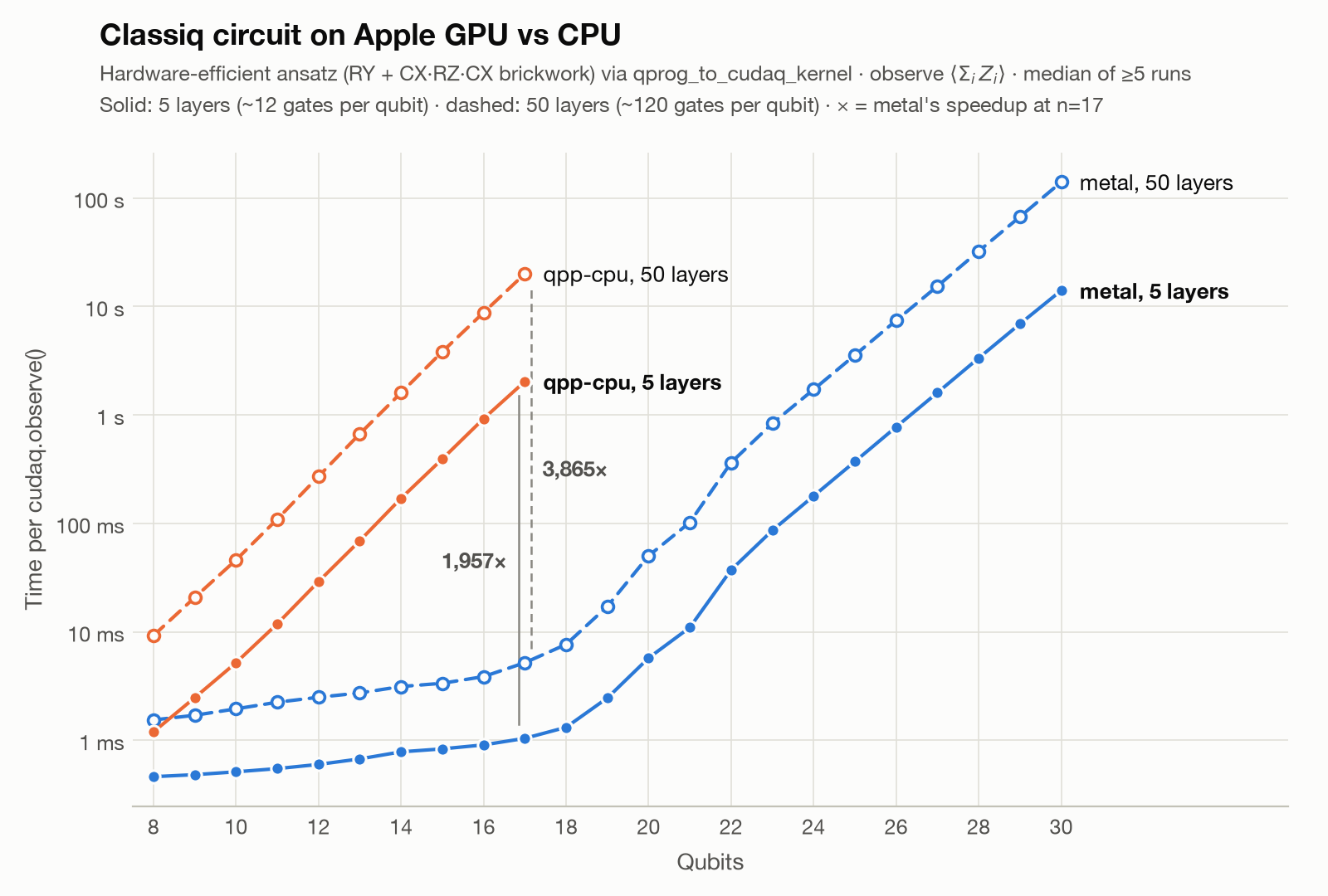
- At 17 qubits the GPU is about 1,960× faster at 5 layers (2.0 s vs 1.0 ms) and about 3,870× faster at 50 layers (20 s vs 5.2 ms).
- At 30 qubits, an 8 GiB statevector, one observe takes 14 s at 5 layers and 141 s at 50. Extrapolating the CPU simulator puts it at about 5 hours and about 2 days.
- 30 qubits is the ceiling on a 24 GB M5 Pro. Metal caps a single buffer at 13.3 GiB on this machine, and 31 qubits needs 16 GiB. A Mac with more memory gets one qubit more.
Is it really 3,870× faster?
Yes and no. qpp-cpu is a general-purpose CPU simulator, not a speed demon. When I compared against a lean, hand-written multithreaded CPU simulator, the GPU was about 3× faster. That's the honest number for "GPU vs a good CPU implementation", and it comes from memory bandwidth.
But qpp-cpu is what CUDA-Q gives you on a Mac today. So for anyone running CUDA-Q on a MacBook, the big number is the one they'll actually notice.
QAOA Max-Cut, end to end
The repo also includes a full QAOA Max-Cut notebook. The model is written at a high level in Classiq, without a single hand-written gate:
@qfunc
def main(params: CArray[CReal, 2 * num_layers], v: Output[QArray[QBit, n]]):
    allocate(v)
    hadamard_transform(v)
    repeat(num_layers, lambda l: [
        phase(-cut(v), params[l]),
        apply_to_all(lambda q: RX(2 * params[num_layers + l], q), v),
    ])
Classiq synthesizes it, qprog_to_cudaq_kernel turns it into a CUDA-Q kernel, and a COBYLA loop calls cudaq.observe on whichever target you pick. The notebook runs the same optimization on CUDA-Q's CPU simulator, on metal, on an NVIDIA T4 in Google Colab, and through Classiq's own execution. Each backend grows until one optimization takes longer than a minute.
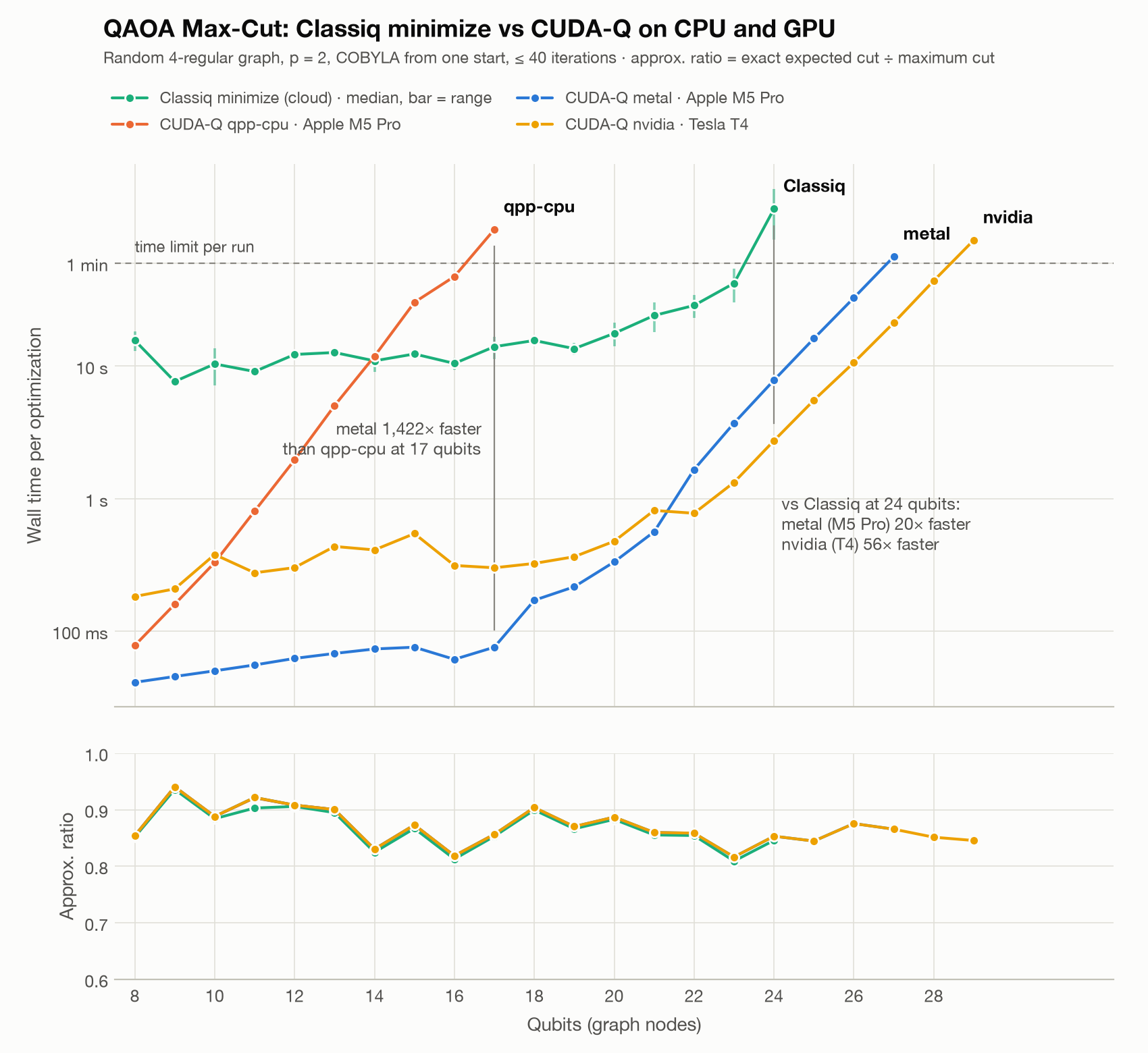
The fun result: my laptop beats the T4 up to 21 qubits. The T4 has a fixed overhead of a few milliseconds per iteration, and at small sizes that dominates. From 22 qubits on, the T4's memory bandwidth takes over and it's about 2–3× faster. All backends reach essentially the same approximation ratios, as they should.
Built with Claude Code
Every line of this project was written with Claude Code. That covers the C++ backend, the Metal shaders, the Python package, the build scripts, the tests and the benchmarks.
Try it
You need an Apple Silicon Mac with macOS 13 or newer, Python 3.11–3.14 and CUDA-Q 0.16. Everything is on GitHub, Apache-2.0 licensed. It's an unofficial community project, not affiliated with NVIDIA.
Model your algorithm in Classiq, export it to CUDA-Q, and run it on whatever GPU you have. Even the one in your laptop.